0
0
0
0
:
0
0
0
0
:
0
0
0
0
Start Clock
Clock Settings

Fake Update Screens
Screensaver Screens

What is Flip Clock?
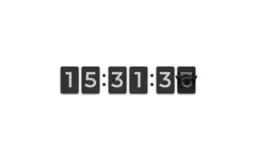
A nostalgic digital flip clock screensaver that mimics the classic mechanical flip displays from the 1970s. Watch each digit flip smoothly from top to bottom as time changes, creating a satisfying retro aesthetic. Perfect for those who appreciate vintage design and smooth animations.
Features
- Realistic 3D flip animation effect
- Smooth transitions every second
- 12-hour and 24-hour format support
- Large, easy-to-read digits
- Classic dark theme design
- Fullscreen mode for immersive experience
- Real-time clock synchronization
- AM/PM indicator for 12-hour format
How to Use
- 1Choose your preferred time format (12-hour or 24-hour)
- 2Click 'Start Clock' or the preview area to enter fullscreen
- 3Watch the digits flip as time progresses
- 4Click anywhere or press ESC to exit fullscreen
- 5Perfect for desk displays or ambient backgrounds
Best Tips
- Use fullscreen mode on a secondary monitor for a dedicated clock display
- 24-hour format is great for international use
- The flip animation is most satisfying when minutes change
- Perfect for vintage aesthetic enthusiasts
- Great as a background during video calls or recordings
- Tip: Watch for the satisfying moment when all digits flip at midnight!